
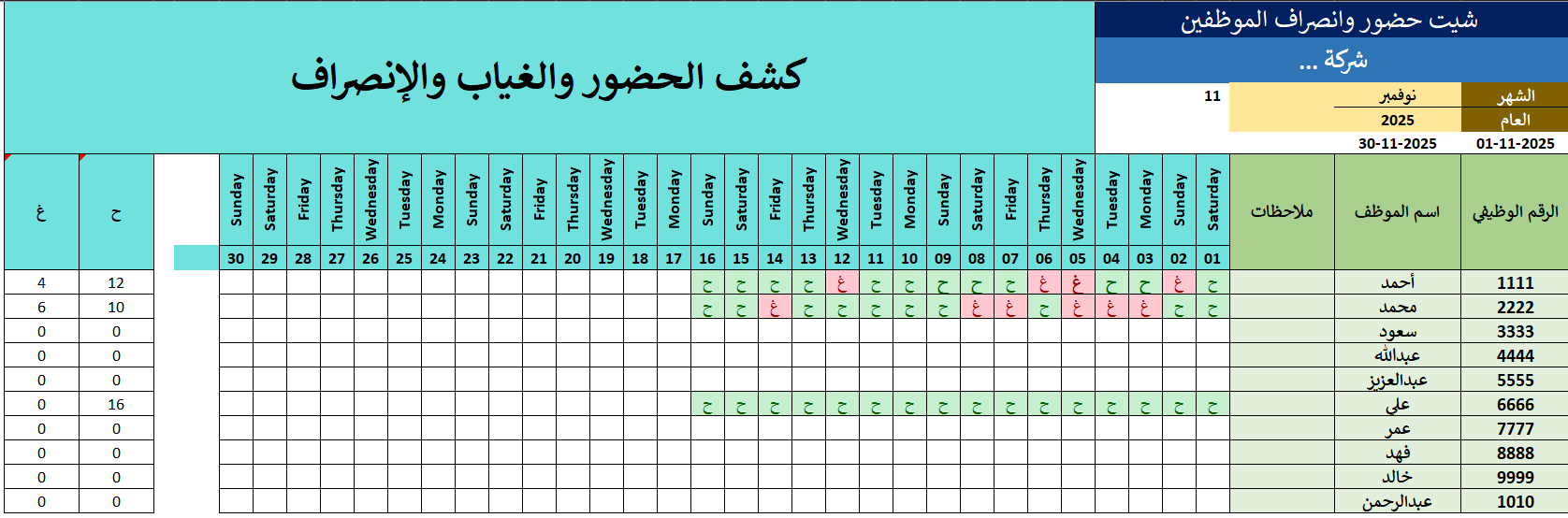
✨ Smart Attendance Excel Sheet — Your All-in-One Automatic Attendance System!
Say goodbye to messy spreadsheets and manual tracking. This intelligent, ready-to-use Excel sheet automates attendance management and saves you hours of work — all with just a single letter input.
You simply enter P (Present) or A (Absent)… and the sheet handles everything else automatically!
🔥 Powerful Features You Will Love:✔ Ready-made Month Selector from an easy dropdown menu
✔ Automatic Year Selector to choose any year instantly
✔ Auto-generated days and dates based on the selected month and year
✔ Pre-designed, clean columns including:
- Employee ID
- Employee Name
- Notes
✔ Automatic calculation of total attendance & absence days for each employee
✔ Exceptionally easy to use even for beginners
✔ Fully editable template, customizable for any company or organization
📘 How to Use:
Simply enter in each day’s cell:
- P = Present
- A = Absent
- The sheet will automatically calculate, arrange, and update everything for you.
✨ A perfect smart tool that boosts productivity, improves accuracy, and makes attendance management effortless!
Note: The file layout is right-to-left.
For custom files, custom modifications to the current file, changing the file’s language or direction, or any other requests, please contact us through the communication channels listed at the bottom of the website.